

NewSprocket v0.4.3 is out
The best AI agent for hardware and software.
Sprocket designs electronics, writes and tests code, and can buy anything that's needed for your project.
Designs electronics
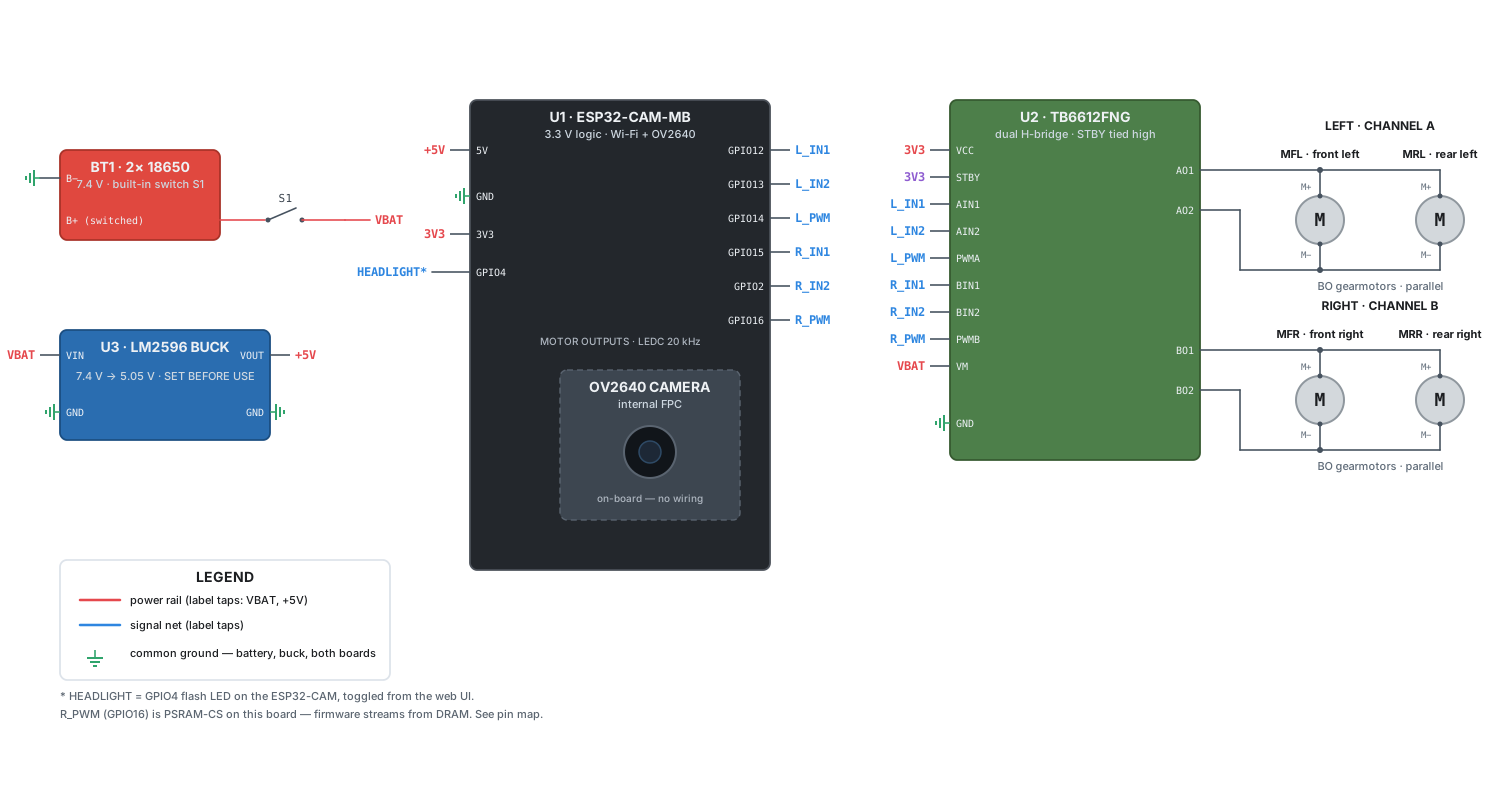
Describe a device, and Sprocket designs the circuit around real parts.
- Draws clear schematics from the datasheets of the parts it picks
- Writes the BOM, pin maps, and step-by-step assembly guides
- Writes and tests the firmware that runs on the board
Works from real docs
Sprocket checks current sources before it acts, so its answers hold up on real hardware.
- Searches the web and reads full pages, not just snippets
- Reads PDFs, spreadsheets, and images you share
- Runs commands to confirm the fix works
Buys what the project needs
Sprocket can buy anything that your project needs, within limits you set.
- You approve each spending limit once with a passkey
- Limits are locked to a merchant and an amount
- Unused money goes back as soon as the order completes
Asks before guessing
When a request is ambiguous, Sprocket asks a quick question instead of assuming.
- Multiple-choice answers for design choices, frameworks, and parts
- An option to let Sprocket decide when you don't mind
- Your answer goes straight into the work
Splits big tasks
Sprocket hands parts of a large task to subagents and keeps working while they run.
- Subagents run in the background and report back when they finish
- Each subagent has its own context, so the main thread stays focused
- Follow their threads in the inbox, send follow-ups, and answer their questions
Everything you need to invent
One agent for the whole build, from the first idea to a working device.
- Schematics
- Readable circuit schematics, plus KiCad files for PCBs
- BOMs and pin maps
- Parts lists and wiring tables for every board
- Assembly guides
- Step-by-step instructions for building the device
- Firmware and apps
- Writes and tests code across your whole system
- Web context
- Searches the web and reads full pages and docs
- Browser
- Clicks through sites, fills forms, and takes screenshots
- Files
- Browse and edit the project, and read PDFs, spreadsheets, and images
- Purchasing
- Buys anything your project needs within approved limits
- Questions
- Asks multiple-choice questions when a task is unclear
- Subagents
- Runs background agents for research, building, and review
- Skills
- Reusable instructions for your workflows, called with $ or /
- AGENTS.md
- Project rules that apply per directory
- Artifacts
- Docs, schematics, and previews in a side panel
- Visuals
- Charts, diagrams, and mockups in replies
- Git
- Branches, worktrees, commits, and linked GitHub pull requests
- Terminal
- Runs builds, tests, and flashing tools for you
- CLI
- Run tasks from your terminal with sprocket run
- Desktop, browser, or phone
- Use the desktop app, a browser, or add it to your phone's home screen
- Your own keys
- Bring API keys and subscriptions from AI providers
- AI usage
- Token use and API cost per run, thread, and account
- Fair source
- Read the code, and self-host anytime
Start building with Sprocket
Download the app, or run it with one command.
See pricing →